ITaskMgr/1.0
It can supervise the processes running on the device..
2004/08/07 Mike Welch build and send me iTaskMgr which has '-m' option. He added -m option so iTaskMgr automatically minimizes when started.
This program has not already been maintained because I have no PocketPC and WindowsMobile. Some programmer started developing new version of ITaskMgr. You can find new version of this program by search engine.
I found... (2009/07/04)
http://www.iaccarino.de/silvio/ppcstuff.htm
http://homepage2.nifty.com/qta/tpn/index.htm
Other programs might be somewhere, too. ;-P
Enjoy mini computer life!
Manual
ITaskMgr has 3 tab screens.
All screen is updated every 1 second.
CPU screen
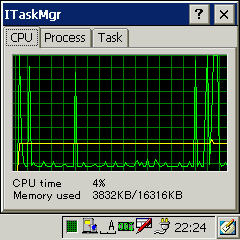
- This screen provides the statistics of CPU usage and the memory usage.
Process screen
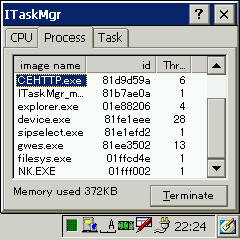
- This screen provides the list of the process.
- The first column is the image name, next is the process id, and the number of threads.
- "Terminate" button can terminate the selected process.
- The memory which is used selected process is displayed.
Task screen
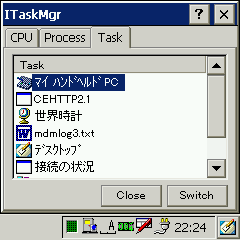
- This screen provides the list of the task running on the device.
A Task is the process having visible window. - "Close" button close the selected task.
(Send WM_CLOSE) - "Switch" brings the task chosen to the foreground.
- The process is shown by double click.
About task tray icon
The task tray icon displays the CPU usage.
note
It is measuring by turning an IDLE thread.
License
New BSD license based as follows.
Copyright (c) 2009, IshiSoft All rights reserved.
Redistribution and use in source and binary forms, with or without modification,
are permitted provided that the following conditions are met:
* Redistributions of source code must retain the above copyright notice, this
list of conditions and the following disclaimer.
* Redistributions in binary form must reproduce the above copyright notice, this
list of conditions and the following disclaimer in the documentation and/or
other materials provided with the distribution.
* Neither the name of the IshiSoft nor the names of its contributors may be used
to endorse or promote products derived from this software without specific prior
written permission.
THIS SOFTWARE IS PROVIDED BY THE COPYRIGHT HOLDERS AND CONTRIBUTORS "AS IS" AND
ANY EXPRESS OR IMPLIED WARRANTIES, INCLUDING, BUT NOT LIMITED TO, THE IMPLIED
WARRANTIES OF MERCHANTABILITY AND FITNESS FOR A PARTICULAR PURPOSE ARE
DISCLAIMED. IN NO EVENT SHALL THE COPYRIGHT OWNER OR CONTRIBUTORS BE LIABLE FOR
ANY DIRECT, INDIRECT, INCIDENTAL, SPECIAL, EXEMPLARY, OR CONSEQUENTIAL DAMAGES
(INCLUDING, BUT NOT LIMITED TO, PROCUREMENT OF SUBSTITUTE GOODS OR SERVICES;
LOSS OF USE, DATA, OR PROFITS; OR BUSINESS INTERRUPTION) HOWEVER CAUSED AND ON
ANY THEORY OF LIABILITY, WHETHER IN CONTRACT, STRICT LIABILITY, OR TORT
(INCLUDING NEGLIGENCE OR OTHERWISE) ARISING IN ANY WAY OUT OF THE USE OF THIS
SOFTWARE, EVEN IF ADVISED OF THE POSSIBILITY OF SUCH DAMAGE.
Change log
| version | contents |
|---|---|
| 0.5 | 05/Jan/2003
beta release |
| 0.6 | 06/Jan/2003 |
| 0.7 | 13/Jan/2003 |
| 0.7b | 05/Apr/2003
Avoid multi starting |
| 1.0 | 02/May2003
release |
Requirements for system
WindowsCE 3.0 or later (HPC/2000,PocketPC,CE.NET)
WindowsCE 2.11 with toolhelp.dll (HPC Pro, PsPC)
SH3/SH4/MIPS/ARM is supported.
The model which had the checked is followes.
- NTT DoCoMo SigmarionIII
- NTT DoCoMo SigmarionII
- NTT DoCoMo SigmarionI (need toolhelp.dll)
- NTT DoCoMo Musea
- HP Jornada 728
- HP Jornada 548
- Toshiba GENIO e550
- Toshiba GENIO e550G
Download
If you use a CE2.1x, downlad toolhelp.dll and put it \windows directory.